Push Notifications for Local Businesses
Your loyal customer hasn't been in for 3 weeks. One push message later, they're sitting in your shop again. Sounds too easy? It is – if you know which push types work, when to send them and what to avoid. This guide shows you everything a local business needs to know about push notifications.
TL;DR
Push notifications are the most direct way to bring loyal customers back. 3 push types work especially well: win-back, bonus reminders and flash deals. GDPR-compliant, anonymous, no email required. From €5/month with Stempely Business.
40–70% open rate – no newsletter achieves that. And you don't need your customers' email addresses.
Basics
What are push notifications?
Short messages that appear directly on your customers' lock screen – without them having to open the app.
Push notifications are short messages that an app sends to your customer's smartphone. They appear as a banner on the lock screen – just like a WhatsApp message or an SMS, but free for you and anonymous for the customer.kostenlos für dich und anonym für den Kunden.
The difference from email or SMS: you don't need any contact details. No name, no email, no phone number. The customer has your stamp card in the app and has allowed push – that's all it takes.
Customer scans QR code
Your customer scans your QR code and has your stamp card in the Stempely app.
Push is allowed
The operating system asks: "Allow notifications?" The customer taps "Yes".
You send messages
In the dashboard you write a message and reach all customers with push at the touch of a button.
Why push for local businesses?
A local business lives on loyal customers. But loyal customers forget you – not out of ill will, but because everyday life takes over. The bakery around the corner, the café on the market square, the hairdresser – out of sight, out of mind.
Push notifications solve exactly this problem. A short message on the lock screen is enough to remind the customer: "Hey, you've got 2 more stamps until your free reward."
40–70%
Open rate for push messages (vs. 15–25% for email)
€0
Cost per message sent – no SMS fees
< 3 sec.
Until the message appears on the lock screen
0
Contact details required – no name, no email, no phone
The decisive advantage: push notifications reach customers at the moment they have their phone in their hand. No spam folder, no "I'll read that later". The message appears, gets read – and the customer decides immediately.
In Practice
3 push types that work
Not every push message is the same. These three types bring local businesses the most revenue.
1. Win-back message
Automatically win back inactive customers
A customer hasn't been in for 14 days? Stempely automatically sends a push message – you don't have to do a thing. The win-back automation detects inactive customers and reminds them about your business.
Example push:
"We miss you! ☕ Your next coffee is waiting – you have 3 more stamps until your free reward."
2. Bonus reminder
Remind customers about pending rewards
A customer has 8 out of 10 stamps – but hasn't come by in a week. A bonus reminder nudges them: "You're almost there!" This works because the customer has already invested and wants to claim the reward.
Example push:
"Just 2 more stamps until your free haircut! ✂ Come in – we look forward to seeing you."
3. Flash deal
Spontaneous offers for immediate revenue
Tuesday afternoon and the shop is empty? Send a flash deal: "Double stamps today!" Flash deals are perfect for quiet times, seasonal offers or new products. You send them manually – exactly when you need them.
Example push:
"Today 2–5 pm: Double stamps on all drinks! 🎉 Today only – come in."
When and how often to send?
The most common question after "How?" is "How often?". And the answer is simple: less is more. Too many push messages cause customers to turn them off – and then you can't reach them at all.Less is more.
Win-back
Automatically after 14–30 days of inactivity
Runs in the background. You set the days once, Stempely sends automatically.
Bonus reminder
Maximum once a week
Only to customers who are actually close to their reward. No mass notification.
Flash deal
Maximum 1–2 times per month
For special occasions: quiet day, new product, seasonal offer. Don't make it a habit.
Golden rule
Every push message should offer the customer concrete added value. "We're open" is not added value. "You have 2 more stamps until your free coffee" is.
Push vs. WhatsApp vs. SMS vs. Email
Many business owners ask themselves: why not just use WhatsApp or SMS? The answer lies in the details – especially regarding data protection, costs and effort.
Conclusion: WhatsApp and SMS have higher open rates, but the price is high: you need contact details, documented consent and pay per message. Push notifications offer the best value for money for local businesses – free, anonymous, GDPR-compliant.
Push messages and GDPR
The most common concern about push notifications: "Am I even allowed to do this?" The answer is yes – if it's implemented correctly. And with Stempely it is implemented correctly.ja
Opt-in through the operating system
iOS and Android explicitly ask the customer: "Allow notifications?" Push notifications are only activated with "Yes". No hidden consent.
Anonymous delivery
The message goes to an anonymous device ID. Stempely knows neither the name nor the email of the recipient. No personal data, no GDPR issue.
Can be deactivated at any time
The customer can deactivate push in the system settings – immediately, without contacting you. Full control with the customer, as GDPR requires.
Why Stempely push is more privacy-friendly than a newsletter:
- No email address required – no double opt-in, no unsubscribe links
- No personal data – message goes to anonymous device ID
- No tracking – no open pixels, no click tracking, no profiling
- Servers in Germany/EU – data does not leave the EU
- Opt-out at any time – via system settings, without effort
Step by step
How to set up push with Stempely
From registration to your first push message in under 10 minutes. No technician needed, no code, no stress.
Register for free
Create your Stempely account and set up your digital stamp card. This takes 5 minutes.
Upgrade to the Business plan (€5/month)
Push notifications are part of the Business plan. You can upgrade at any time – and cancel at any time.
Customers collect stamps
Your customers scan your QR code and have your stamp card in the app. Push is automatically requested by the operating system.
Activate win-back automation
Set how many days of inactivity trigger an automatic win-back message (e.g. 14 or 30 days).
Send flash deals and bonus reminders
Open the dashboard, select the push type, write your message and click send. Done.
Your Dashboard
Send push messages – directly from the dashboard
No technical setup. Choose the push type, write your message and reach all customers at the touch of a button.
1.281
Gesamtkunden
6.316
Gesamtstempel
3.114
Eingelöste Belohnungen
Live
Stempel heute
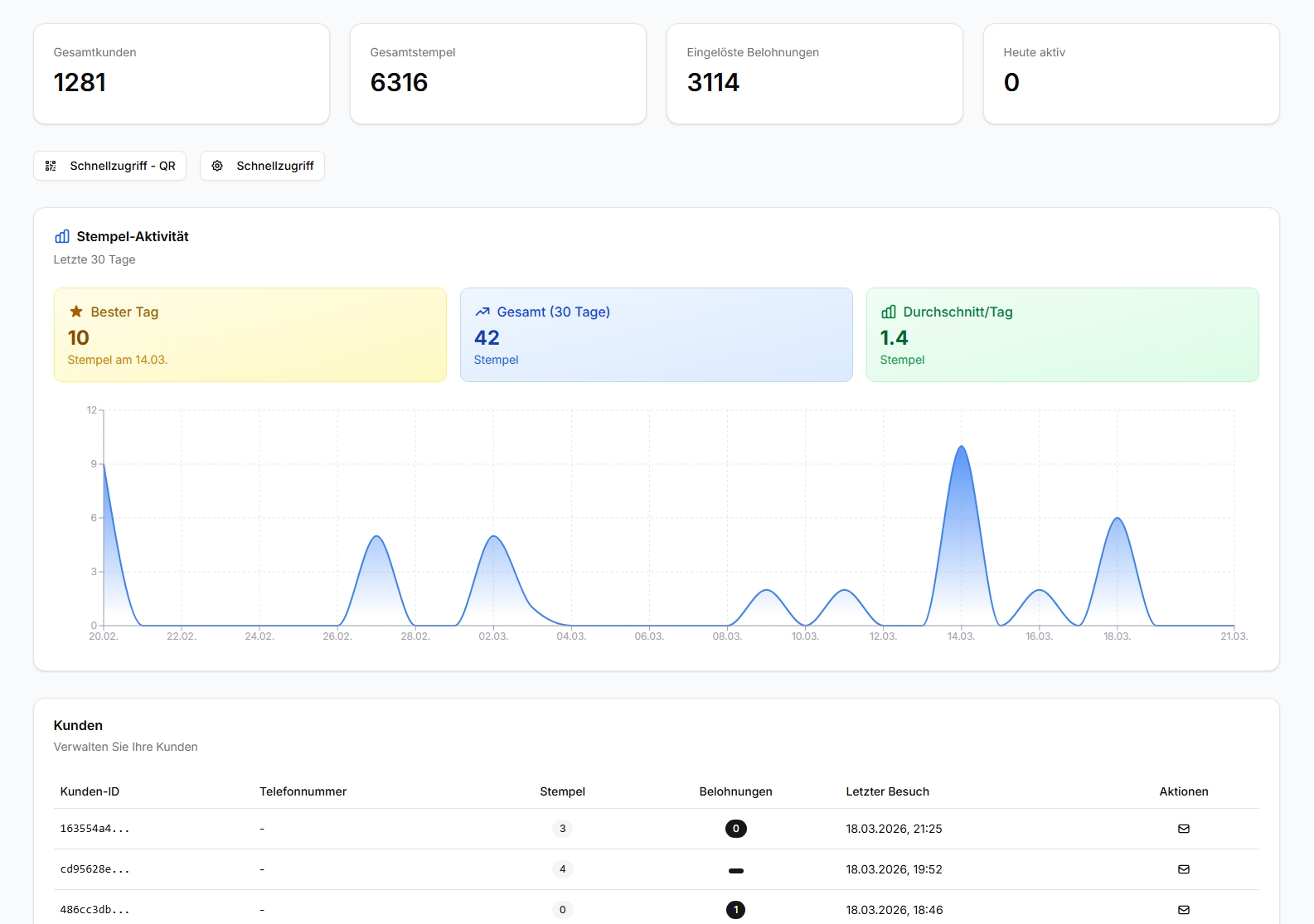
Real production data. Push messages, customer list, stamp activity – all anonymous, all in real time.
Choose your plan
Start free and upgrade as your business grows.
Basic
- Up to 50 stamp cards
- Digital loyalty card
- QR code scanner
- Basic statistics
- Customer management
- Configurable stamp card
- Contactless stamps (NFC)
- Send offers & reminders
Business
- Unlimited stamp cards
- All Basic features
- QR code with logo
- Advanced statistics
- CSV export
- Automatic reminders
- Contactless stamps (NFC)
- Send offers & reminders
Premium
- All Business features
- Contactless stamps (NFC)
- 2x NFC tags included
- Send offers & reminders
- Multi-location
- Multiple stamp cards
- Priority support
- Custom app
Enterprise
On request
- Custom app with your branding
- Custom logo & design
- Custom logic & workflows
- Unlimited locations
- Dedicated account manager
- Custom integrations
- Everything from Premium
- Unlimited scalability
All prices exclude applicable VAT.
8 frequently asked questions: push notifications for businesses
What does it cost to send push notifications with Stempely?
Push notifications are part of the Business plan for €5/month. The free plan does not include the push feature. The Business plan includes unlimited push messages to all your customers – with no additional cost per message.
Do I need technical knowledge to send push messages?
No. You open the Stempely dashboard, select the push type (e.g. win-back or flash deal), write your message and click send. The entire technical infrastructure runs in the background – you don't need app development, an API or an IT service provider.
How many customers can I reach with a push message?
All customers who have your stamp card in the Stempely app and have allowed push notifications. Experience shows that 60–80% of app users keep push activated. The open rate is 40–70% – significantly higher than email (15–25%).
Are push notifications GDPR-compliant?
Yes. The customer actively gives their consent via the operating system (iOS/Android opt-in). The message is sent to an anonymous device ID – Stempely knows neither name nor email. Customers can deactivate push at any time in the system settings.
Can I schedule push messages?
Win-back messages are sent automatically when a customer hasn't been in for a certain number of days (e.g. 14 or 30 days). Flash deals and bonus reminders you send manually when you need them – for example before a quiet afternoon.
What is the difference between push and a newsletter?
For a newsletter you need the customer's email address, double opt-in, a privacy policy and an unsubscribe option. With push you need none of that. The customer allows push via the operating system, the message goes to an anonymous ID. No account, no email, no effort.
How often should I send push messages?
Maximum 1–2 times per week. Less is more. The most effective businesses send 2–4 push messages per month: one win-back automation, one bonus reminder and occasionally a flash deal. Too many messages cause customers to deactivate push.
Do push notifications work for small businesses with few customers?
Especially then. A café with 50 regular customers that sends a win-back message to 10 inactive customers and brings back 4 of them immediately has measurable revenue. Push is not mass marketing – it's personal customer loyalty at the touch of a button.
"One win-back message on Monday and by Tuesday 4 customers were back in the shop that I hadn't seen in weeks. For €5 a month it's a no-brainer."
— A. K., Café owner, Cologne
Win back loyal customers. Starting today.
Push notifications, win-back automation, bonus reminders – all included in the Business plan for €5/month. No contact details required, GDPR-compliant.
Start for free with the Free plan. Upgrade to Business when you need push.
Get started now — no contract, no credit cardFree plan always free · Business from €5/month · Cancel any time
Auch direkt als App verfügbar